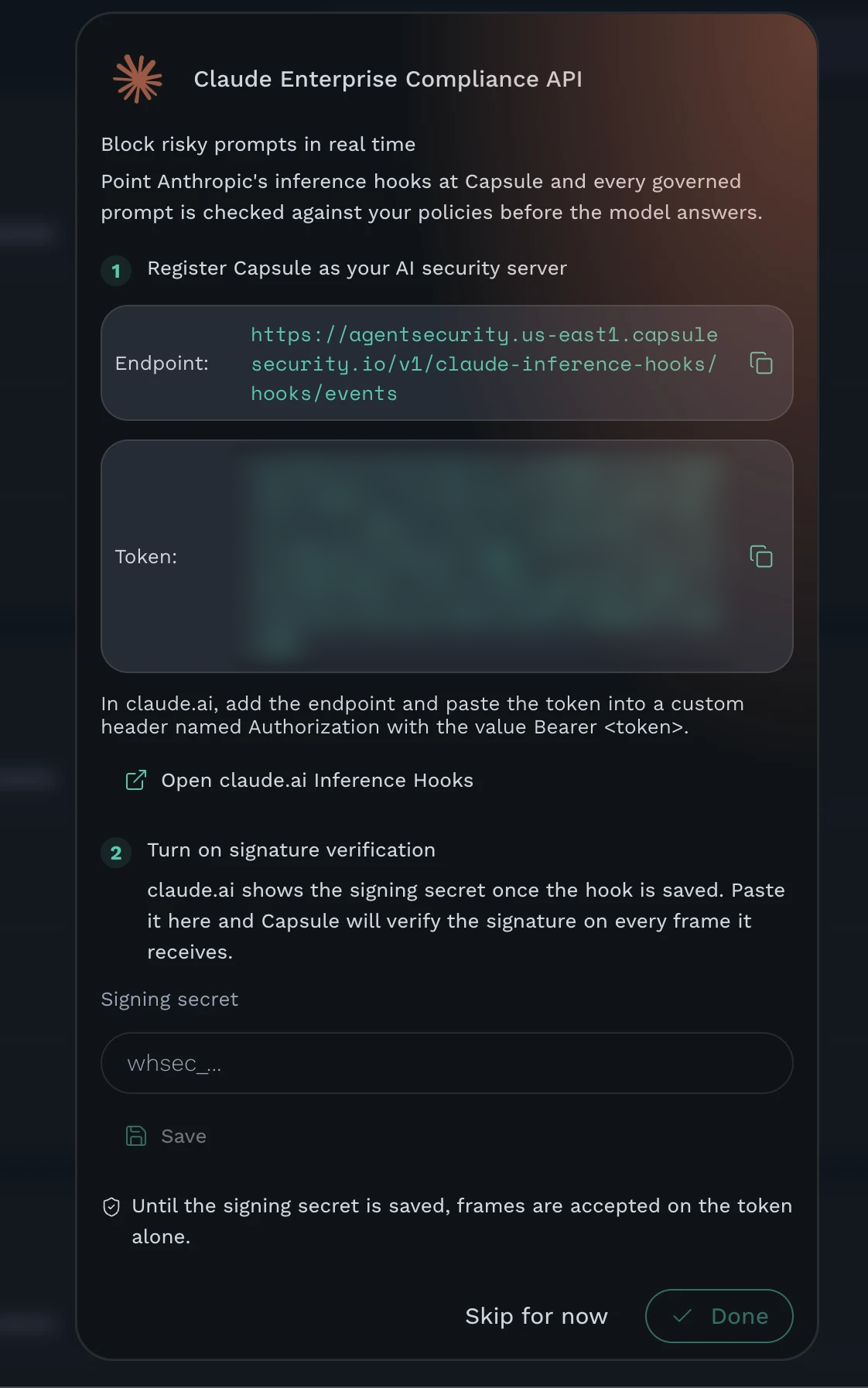
Register Capsule as your AI security server for Anthropic's inference hooks so every governed Claude prompt is checked against your policies before the model answers.
Inference hooks let Anthropic hold a user's prompt until an external AI security server returns an allow or deny verdict. Capsule is that server:
- Real-time enforcement - each governed prompt in claude.ai and Claude Code is evaluated against your policies, and a policy hit denies the prompt before the model sees it
- Tool call enforcement - with Validate tool calls on, each tool call Claude makes is evaluated against your tool and MCP policies before it runs
- Denial feedback - a denied prompt shows the policy's reason to the user in claude.ai, along with a reference ID you can search on in Capsule
- Observability - every prompt is also recorded as a user message, and every tool call as a tool invocation, on the acting user's agent, so blocked and allowed activity share one timeline
Hooks build on the Claude Enterprise Compliance API integration and reuse its per-user agents (Claude Enterprise/<email>). Set that integration up first - the hook frame's actor is the same identity that keys those agents.
Note: Inference hooks govern prompts at the moment they are sent. They do not replace the Compliance API integration, which backfills members, the activity feed, and full conversation history.
Before you begin, ensure you have:
- An active Claude Enterprise plan with inference hooks enabled for your organization
- The Claude Enterprise Compliance API integration already connected in Capsule
- Primary owner access in claude.ai, required to register an AI security server
- At least one policy configured in Capsule, otherwise every prompt is allowed
Capsule generates a per-environment endpoint URL and bearer token. These are what you register in claude.ai.
Log in to the Capsule Security portal
Click Integrations in the left sidebar
Open the Claude Enterprise Compliance API card. After the Compliance API credentials are saved, the card advances to Block risky prompts in real time
Copy the Endpoint and the Token using the copy buttons
Note: The token is scoped to your tenant and environment. Treat it as a credential - anyone holding it can post frames to your endpoint.
Go to claude.ai/admin-settings/inference-hooks, or click Open claude.ai Inference Hooks from the Capsule card
Create a hook and paste the Endpoint from Step 1 into the URL field
Add a custom request header:
- Name:
Authorization - Value:
Bearer <token>, using the token from Step 1
- Name:
Save the hook. Anthropic immediately sends a connection test frame to the endpoint, which Capsule answers with an allow verdict
- Copy the signing secret claude.ai shows once the hook is saved. It starts with
whsec_...
Note: Anthropic only reveals the signing secret after the hook exists, which is why setup is a two-pass round trip. Until you complete Step 3, frames are authenticated by the bearer token alone.
Turn on Validate tool calls in the hook settings to also send Capsule each tool call Claude makes - connector and MCP tools, web search, and Claude Code tools such as Bash - before it runs. A denied tool call stops every call in that response and shows the policy's reason to the user. Each tool call verdict adds Capsule's round trip before the tools run.
Back in the Capsule card, paste the
whsec_...value into Signing secret and click SaveCapsule re-issues the bearer token so it carries the secret. Copy the new Token
Replace the header value in claude.ai with the new token and save the hook again
The card shows Signature verification is on. Click Done
Capsule keeps the two most recent secrets active, so frames still signed with the previous one keep verifying while claude.ai finishes a rotation. To rotate, paste the new secret in Capsule, copy the re-issued token back into claude.ai, and save.
| Inference hook frame | Appears in Capsule as |
|---|---|
| Prompt actor (user id and email address) | Owner on the per-user Claude Enterprise/<email> agent |
| Latest user turn, including text extracted from attachments | User message audit on that agent |
| Tool call, with its input (Validate tool calls on) | Tool invocation audit on that agent, and the tool in its inventory |
| Session ID | Session in Observability, shared with Compliance API conversations |
| Tool use and attachment names | Metadata on the audit entry |
| Policy denial | Detection, with the reason and reference ID shown to the user |
Frames are queued and ingested asynchronously so persistence never delays the verdict returned to Anthropic.
| Symptom | Cause | Fix |
|---|---|---|
| Signing secret must start with whsec_ | A token or organization ID was pasted into the signing secret field | Copy the whsec_... value claude.ai shows after the hook is saved |
| claude.ai reports the hook is unauthorized | The Authorization header is missing or misspelled | Re-add the header as Authorization with the value Bearer <token> |
| claude.ai reports invalid signature after Step 3 | The token in claude.ai is still the pre-secret one | Copy the re-issued token from the Capsule card and save the hook again |
| Frames rejected with a signature error, no rotation in progress | The sending or receiving clock is off by more than 5 minutes | Correct the system clock; Anthropic's signed timestamp is checked against a 5 minute tolerance |
| Prompts are never denied | No policy matches, or the acting user has no Claude Enterprise agent yet | Confirm the Compliance API integration has synced, then check the policy's scope and trigger |
| Tool calls are never denied or recorded | Validate tool calls is off in claude.ai | Turn on Validate tool calls in the hook settings and save |
| Card shows Until the signing secret is saved, frames are accepted on the token alone | Step 3 has not been completed | Paste the signing secret and copy the re-issued token back into claude.ai |
Anthropic POSTs one frame per governed prompt to POST /v1/claude-inference-hooks/hooks/events and blocks inference until Capsule answers. Capsule replies with {"action": "allow"} or {"action": "deny", "deny_reason": "...", "reference_id": "..."}.
With Validate tool calls on, Anthropic also POSTs a tool_call frame to the same endpoint whenever a response contains tool calls, before any of them runs. One verdict covers every call in the frame, so Capsule evaluates each call on its own and denies the frame if any call hits a policy.
Authentication runs in two layers. The bearer token is a per-environment JWT that carries the tenant, the environment, and (after Step 3) the signing secrets, so verification needs no database lookup. When secrets are present, each frame is additionally checked against its Standard Webhooks signature - an HMAC-SHA256 over {webhook-id}.{webhook-timestamp}.{raw body}, compared against the raw bytes Anthropic signed.
Anything but a 200 carrying a parseable verdict is a webhook failure, which never reads as a deny. Anthropic hands the outcome to your organization's failure handling setting instead, and that setting can block the prompt outright; sustained failures also trip a circuit breaker that stops enforcement until your endpoint recovers. Capsule therefore answers 200 with a verdict on every decided path, allows frame types it does not recognise, and allows when analysis is unavailable, so a Capsule-side problem never decides the outcome for your users. A prompt is denied only on an explicit policy hit.
deny_reason is truncated to 500 characters and is what the end user sees on a block. reference_id is truncated to 50 characters and restricted to the characters Anthropic accepts; it is never shown to the user. Capsule sends the frame's request_id, so a denial in the claude.ai Activity Feed joins straight back to the matching Capsule violation.
For help with this integration:
- Email: support@capsule.security
- Include: Your tenant ID, your Anthropic Organization ID, and the reference ID from any unexpected denial